
Last Updated: November 4, 2026
Quick Summary
Use a Power Platform training provider selection checklist that scores vendors on hands-on ratio, instructor credentials, class size, environment access, written deliverables, post-training support and customization, and require written evidence for each claim. Shortlist three providers, score them against the same weighted criteria, and request a sample lab guide and instructor certifications before you sign.
- Write down the business problem in one sentence before opening any vendor page.
- At least 50% of class time should be hands-on in the tool.
- Most effective foundation courses run two to four days, then add role-specific modules.
- Ask vendors to itemize quotes into categories so you can compare like with like.
- Train in cohorts, set a build deadline within two weeks, and track one metric.
Table of Contents
- Why a Selection Checklist Beats a Resource List
- Provider Vetting Criteria That Separate Real Training From Slide Decks
- Power Platform Training Duration and Curriculum: What a Real Program Covers
- Power Platform Consulting vs Training: When You Need Both
- Power Platform Training Best Practices for Mid-Market Teams
- Budgeting, ROI, and the Corporate vs Individual Training Decision
- Build Your Shortlist With a Free Consultation
- Frequently Asked Questions
Why a Selection Checklist Beats a Resource List
A Power Platform training provider selection checklist is a structured set of questions you use to compare vendors before you spend money.
The problem is simple. Most buyers search for "Power Platform training," collect a dozen links, and pick the cheapest or the loudest.
Below, we show you exactly how to screen a provider in five steps. We also cover what a real curriculum looks like, when training is not enough, and how to budget without guessing.
Start With the Business Problem, Not the Course Catalog
Training is not the goal. Fixing a manual process is.
So before you open a single vendor page, write down the problem in one sentence.
Then ask what skill your team needs to solve it. That answer filters providers fast.
Watch out: teams that skip this step often buy the biggest catalog instead of the right course. They pay for breadth and get nothing they can apply on Monday.
Provider Vetting Criteria That Separate Real Training From Slide Decks
The fastest way to spot a weak provider is to ask what attendees will build. A real program answers with specifics: a working app, a flow that runs, a dashboard fed by live data.
Many buyers stop there and pick on gut feel. A better approach is to score every vendor against the same weighted criteria and require evidence for each claim.
| Criterion | What to ask for | Weight | Pass threshold |
|---|---|---|---|
| Hands-on ratio | Agenda showing lab time per module, plus one sample lab guide | 25% | At least 50% of class time in the tool |
| Instructor credentials | Named instructor, Microsoft Certified Trainer status, current Power Platform certifications | 20% | Credentials verifiable and current |
| Class size and format | Maximum seat count, delivery mode, recording policy | 15% | Small enough for individual feedback |
| Environment access | Whether attendees get their own tenant or a dedicated sandbox | 15% | Every attendee can build, not just watch |
| Written deliverables | Lab guides, reference material, solution files attendees keep | 10% | Materials are yours after class |
| Post-training support | Length and channel of the follow-up window | 10% | At least two weeks of access |
| Custom curriculum | Willingness to tailor modules to your process | 5% | Sample customization proposal provided |
Score each vendor from 1 to 5 per row, multiply by the weight, and total. A provider that cannot supply evidence for a row scores a 1 on it. In practice, most teams find that two or three vendors separate cleanly once the evidence requirement is applied.
The Evidence Request That Exposes Weak Providers
Send every shortlisted vendor the same written request before the demo. Ask for:
- The instructor's name and a link to their certification record
- A redacted sample lab guide from the module closest to your use case
- The agenda with time allocations, not just topic names
- A sample of the reference material attendees take home
A provider that answers in a day with attachments is usually real. One that deflects to a sales call, sends a brochure, or promises materials "after signing" is telling you something. Watch out: a polished demo deck is not evidence of lab quality, and many buyers mistake presentation skill for teaching skill.
Instructor Credentials and Hands-On Access
Ask for the instructor's name and certifications before you sign. Then ask how much of the class is spent in the tool versus watching someone talk.
A sensible rule of thumb is that at least half the time should be hands-on.
For a deeper look at what to demand from a vendor, read our buyer's guide to hands-on Power Platform team training.
Power Platform Training Duration and Curriculum: What a Real Program Covers
Most effective team programs run two to four days for a foundation course, then add role-specific modules. A one-day overview can build awareness, but it will not create builders. A five-day bootcamp often front-loads too much and loses people by day three.
A solid curriculum covers the core tools in context:
- Power Apps for canvas apps and model-driven apps
- Power Automate for workflow and approvals
- Dataverse for data modeling and business logic
- Power BI for analytics and reporting
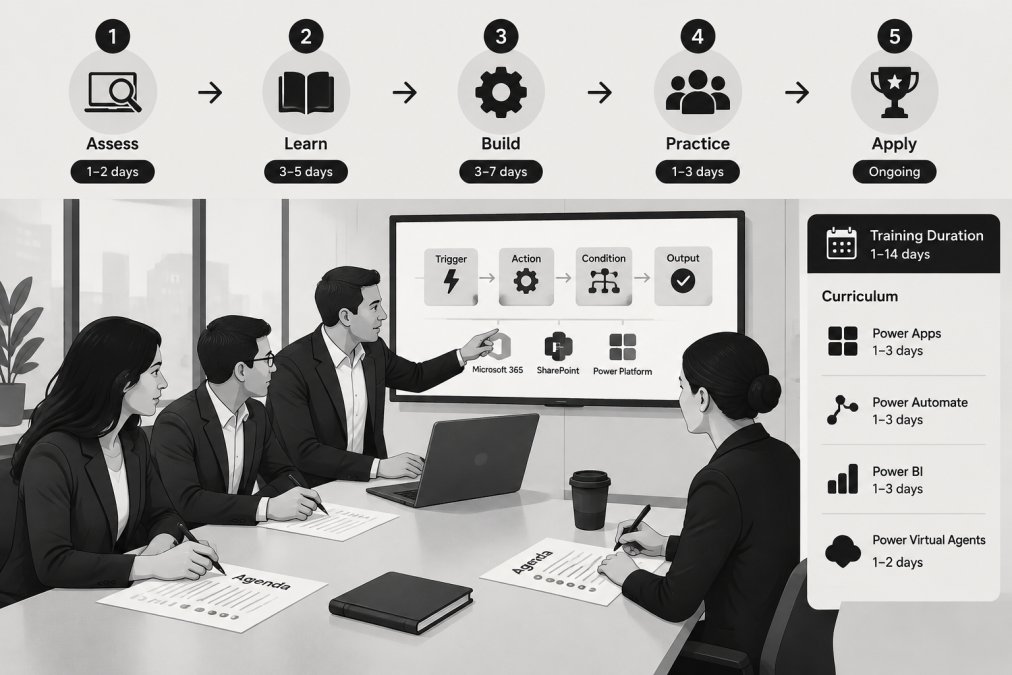
Good programs also cover governance basics: environments, security roles, and the difference between low-code and no-code approaches. Teams that skip governance build sprawl they later have to clean up.
For a concrete comparison point, look at our three-day Power Platform Essentials program. It shows how much ground a focused agenda can cover, which helps you judge other proposals.
Matching the Learning Path to the Role
Not everyone needs the same content. Match the path to the job:
- Business users: canvas apps, Power Automate, and basic Dataverse
- Developers: model-driven apps, plugins, and custom connectors
- Analysts: Power BI data modeling and dashboards
- Admins: environment strategy, security, and governance
- Architects: solution design and integration
Certification paths follow the same logic. Fundamentals suits beginners. Associate and Expert levels suit specialists. If you want to map roles to workshops, browse the full expert-led Microsoft training catalog and compare tracks side by side.
Power Platform Consulting vs Training: When You Need Both
Training teaches your team to build. Consulting delivers a working solution and transfers knowledge along the way.
Pick training alone when:
- Your team has capacity to build after the class
- The process is simple and well understood
Pick consulting when:
- The build is complex or business-critical
- You need governance and security set up correctly from day one
- Your team is already stretched thin
Many mid-market teams need both. A consultant builds the first solution with your staff in the room, then trains them to maintain it.
If you want to see what a consulting engagement adds, review our Power Platform consulting services covering app development, workflows, dashboards, and agents.
Power Platform Training Best Practices for Mid-Market Teams
The best programs share a few habits. They start small, measure something, and keep going after the class ends.
Follow these practices:
- Pick one real process as the practice project.
- Train in cohorts so peers can help each other.
- Set a build deadline within two weeks of class.
- Name internal champions who keep momentum.
- Track one metric, such as approval time or support tickets.
- Schedule a follow-up session a month later.
A common mistake is training everyone at once and giving nobody a project. Skills fade fast without use. In practice, teams that ship one small app in the first month keep using the platform; teams that do not, drift back to email.
Budgeting, ROI, and the Corporate vs Individual Training Decision
Corporate training often costs more up front but can deliver greater total value. Individual courses are typically cheaper per person, yet they can scatter knowledge and leave no shared standards. The decision is not really about price per seat; it is about whether the training produces a shared capability your team can maintain.
Build the Budget From Cost Categories, Not Seat Counts
Most training proposals bundle everything into one number, which makes comparison impossible. Ask vendors to break the quote into these categories so you can compare like with like:
- Instruction and curriculum licensing
- Environment and sandbox provisioning
- Materials and lab guides
- Customization to your process
- Post-training support window
A fixed-price engagement tied to defined deliverables removes the surprise at the end. When a vendor will not itemize, treat the single number as an estimate, not a quote.
A Simple ROI Model You Can Defend to Management
You do not need a finance team to justify training. You need three inputs and one comparison.
- Hours removed. Estimate the manual hours the target process consumes per month across the team.
- Loaded hourly cost. Use payroll plus benefits, not salary alone.
- Adoption assumption. Assume only a portion of trained staff actually build and maintain solutions; a common pattern is that a minority of a cohort becomes the regular builders.
Then compare the annualized value of hours removed against the total training cost, including the opportunity cost of attendees being out of the field for the class days.
Watch out: ROI models that assume every attendee becomes a builder overstate the return and get challenged in budget reviews.
Corporate vs Individual Training: A Decision Structure
Use the table below to pick the format, then revisit it as your team grows.
| Decision | Best For | Watch Out For |
|---|---|---|
| Corporate, instructor-led | Teams of 5+ with a shared process | Fixed schedules |
| Individual self-paced | One person exploring the platform | No feedback or support |
| Consulting plus training | Complex builds and governance | Higher upfront cost |
| In-app adoption tools | Ongoing support after launch | Needs setup and content |
A practical rule: if the process you are fixing touches more than one role, individual courses will not create the shared standards you need.
Pricing depends on scope, class size, and delivery format, so ask each vendor for a written quote tied to defined deliverables.
Build Your Shortlist With a Free Consultation
A checklist only helps if you use it on real vendors. Narrow your list to three, score each against the criteria above, and ask for a sample lab and instructor credentials.
If you want a second opinion before you commit, schedule a free consultation to review your process, your team, and the right training path.
Frequently Asked Questions
What should I look for in a Microsoft Power Platform training provider?
Look for an instructor with current Microsoft Certified Trainer status, a curriculum built around your actual processes rather than generic slides, and hands-on labs where your team builds in Power Apps, Power Automate, and Power BI. Ask how the provider measures skill gain after the session. A provider that cannot describe its post-training assessment or follow-up support is selling attendance, not capability.
Does my IT team need certified instructors for Power Platform training?
Certification is not a legal requirement, but it is a useful quality signal. A Microsoft Certified Trainer has passed the exams your team will face and must recertify, so the content stays current with platform changes. Pair that credential with evidence of delivery experience: ask for references from organizations of similar size and for sample lab environments your team would use during the course.
What is the difference between generic Power Platform training and custom consulting?
Generic training teaches features in a sandbox; custom consulting applies them to your environment. Power Platform consulting vs training is not either-or. The strongest engagements combine both: consultants configure a working solution alongside your team, then train that team to maintain it. Ask any provider to state in writing which model they follow and what your staff will be able to do unaided when the engagement ends.
How do I measure the ROI of Power Platform training for my organization?
Pick baseline metrics before training starts: support ticket volume, manual approval cycle time, and the number of active Power Automate flows or Power Apps in use. Re-measure 90 days after the course. A training program tied to a real workflow should move at least one of those numbers. If you cannot connect the course to a process the business cares about, the ROI case will be weak no matter how good the instructor is.
The real risk is not picking the wrong vendor. It is spending a budget on training your team cannot apply. MTRC Enterprises delivers hands-on implementation, knowledge transfer in every engagement, and fixed-price scopes with defined deliverables. Our Microsoft Certified Trainer works alongside your staff so they own the solution when we leave. Get started with MTRC Enterprises and turn one manual process into a working app your team can maintain.
